Deploying to Microsoft Fabric with the Fabric CLI: First Impression

Microsoft Fabric now has a proper CLI deploy, and it works. I built a fully automated CI/CD pipeline that deploys a Python notebook, Lakehouse, Semantic Model, and Data Pipeline to Fabric using nothing but the fab CLI and GitHub Actions. Here’s what I learned along the way , what works great, what to watch out for, and where a few small additions could make the experience even better.

The full source code is available on GitHub: djouallah/dbt_fabric_python_notebook.

The Blog and the code was written by AI, to be clear, Fabric had always excellent API. and I perosnally used adhoc pythion script to deploy, but this time, it feels more natural

maybe the main take away when working with Agent and writing python code, logs everything including API response specially at the begining, AI is very good at autocorrecting !!!

The Goal

Push to main or production, and everything deploys automatically:

  1. Lakehouse gets created (with schemas enabled)
  2. Python Notebook gets deployed and attached to the Lakehouse (dbt need local path)
  3. The notebook’s supporting files get copied to OneLake
  4. The notebook runs — transforming data and creating Delta tables
  5. Direct Lake Semantic Model gets deployed (pointing at those Delta tables)
  6. Data Pipeline gets deployed and scheduled on a cron

No portal clicks. No manual steps. Just git push.


Project Structure

├── deploy.py # Orchestrates the entire deploy
├── deploy_config.yml # Per-environment config (workspace IDs, schedules)
├── fabric_items/
│ ├── data.Lakehouse/ # Lakehouse definition
│ ├── run.Notebook/ # Python notebook (.ipynb)
│ ├── aemo_electricity.SemanticModel/ # Direct Lake model
│ └── run_pipeline.DataPipeline/ # Scheduled pipeline
├── dbt/ # Data transformation project
└── .github/workflows/
├── ci.yml # Tests on every push
└── deploy.yml # Deploys to Fabric

Each Fabric item lives in a folder named {displayName}.{ItemType} under fabric_items/. The deploy script discovers them dynamically — no hardcoded item names.


What Works Well

The fab deploy command is brand new — v1.5.0, March 12, 2026. For a tool that just shipped, two things stood out.

Native .ipynb Support for Notebooks

Fabric’s default Git format for notebooks is notebook-content.py — a custom FabricGitSource format that flattens your notebook into a single .py file with metadata comments. It’s fine for Git diffs, but you lose the cell structure, can’t preview outputs, and can’t use standard Jupyter tooling to edit it.

As of Fabric CLI v1.4.0 (February 2026), you can now deploy notebooks as standard .ipynb files. Before v1.4.0, the CLI only supported the .py format.

With .ipynb support, what you see in VS Code or Jupyter is exactly what gets deployed:

fabric_items/
run.Notebook/
.platform
notebook-content.ipynb # standard Jupyter format, deployed as-is

You can edit notebooks locally with proper cell boundaries, use Jupyter tooling, and the deploy just works. Notebooks are finally first-class citizens in the deployment story.

model.bim Is Beautifully Simple

Fabric supports two formats for Semantic Models: TMDL (a folder of .tmdl files, one per table — the default) and TMSL (a single model.bim JSON file). TMDL is better for Git diffs on large models. But for my use case, model.bim is perfect.

One file. Everything in it — tables, columns, measures, relationships, and the Direct Lake connection. The entire environment-specific configuration boils down to a single OneLake URL:

https://onelake.dfs.fabric.microsoft.com/{workspace_id}/{lakehouse_id}

Two GUIDs. That’s it. Swapping environments is a two-line string replacement:

bim_path.write_text(
bim_text.replace(source_ws_id, WS_ID)
.replace(source_lh_id, target_lh_id)
)

Compare this to the pipeline, where you’re hunting through deeply nested JSON paths with fab set. The BIM format is refreshingly straightforward.

The deploy works perfectly with just Python string replacement — three lines of code and a git checkout to restore.


TMSL (model.bim) vs TMDL: Which Format for CI/CD?

Fabric supports two formats for Semantic Models, and this choice matters more than it might seem.

TMDL is the default. It splits your model into a folder of .tmdl files — one per table, plus separate files for relationships, the model definition, and the database config:

definition/
├── tables/
│ ├── dim_calendar.tmdl
│ ├── dim_duid.tmdl
│ └── fct_summary.tmdl
├── relationships.tmdl
├── model.tmdl
└── database.tmdl

TMSL is a single model.bim JSON file with everything in it.

For CI/CD pipelines, TMSL wins hands down. Here’s why:

  1. One file to manage. Your deploy script reads one file, replaces two GUIDs, deploys, and runs git checkout to restore. With TMDL, you’d need to find which .tmdl file contains the OneLake URL and handle multiple files.
  2. Two .replace() calls. The entire environment swap is two string replacements on one file. With TMDL, the connection expression lives in model.tmdl, but table definitions reference it indirectly — more files to reason about during deployment.
  3. Easier to grep and debug. When something goes wrong with your Direct Lake connection, you open one file, search for the OneLake URL, and see everything. No jumping between files.

When TMDL makes more sense:

  • Large models with dozens of tables where multiple people edit measures and columns — per-file Git diffs are cleaner and merge conflicts are smaller
  • Teams using Tabular Editor who need reviewable PRs on individual table changes
  • Models that change frequently at the table level

But if your semantic model is authored once and deployed across environments — which is the typical CI/CD pattern — you’re not reviewing table-level diffs. You’re swapping two GUIDs and pushing. TMSL keeps it simple.

I chose model.bim and haven’t looked back.


Things to Know Before You Start


Lesson 1: Deploy Order Matters — A Lot

This was my biggest source of failed deployments. Fabric items have implicit dependencies, and deploying them out of order causes cryptic failures.

The correct sequence:

Lakehouse → Notebook → (run notebook) → Semantic Model → Data Pipeline

Why this specific order:

  • The Notebook needs a Lakehouse to attach to. If the Lakehouse doesn’t exist yet, the attachment step fails.
  • The Semantic Model uses Direct Lake mode, which validates that the Delta tables it references actually exist. If you deploy the model before running the notebook that creates those tables, validation fails.
  • The Data Pipeline references the Notebook by ID. You need the Notebook deployed first to get its target workspace ID.

I ended up with a strict 7-phase deploy script:

# 1. Create/verify Lakehouse (with schemas enabled)
# 2a. Deploy Lakehouse
# 2b. Deploy Notebook
# 2c. Attach Lakehouse to Notebook via fab set
# 3. Copy supporting files to OneLake
# 4. Run the Notebook (blocks until complete)
# 5. Deploy Semantic Model (Delta tables now exist)
# 6. Refresh Semantic Model via Power BI API
# 7. Deploy + schedule Data Pipeline

Lesson 2: fab job run Does Nothing for Notebooks Without -i '{}'

This one cost me hours of debugging. Running a notebook via the CLI:

# Does NOTHING — silently succeeds but notebook never executes
fab job run prod.Workspace/run.Notebook
# Actually runs the notebook
fab job run prod.Workspace/run.Notebook -i '{}'

Notebooks require the -i '{}' flag (empty JSON input). Without it, the command returns success but the notebook never fires. There’s no error, no warning — it just silently does nothing.


Lesson 3: parameter.yml Token Replacement Is Surprisingly Limited

Fabric CLI has a parameter.yml mechanism for replacing GUIDs across environments. The idea is great — use tokens like $workspace.id and $items.Lakehouse.data.$id that get resolved at deploy time.

In practice, the rules are strict and poorly documented:

Tokens only resolve if the entire value starts with $

# WRONG — token is embedded in a URL, never resolves
replace_value:
_ALL_: "https://onelake.dfs.fabric.microsoft.com/$workspace.id/$items.Lakehouse.data.$id/"
# CORRECT — each token must be its own replacement entry
- find_value: "e446a5e7-..."
replace_value:
_ALL_: "$workspace.id"

The $items token format is strict

$items.Lakehouse.data.$id # correct: $items.{type}.{name}.$attribute
$items.data.$id # WRONG: "Invalid $items variable syntax"

is_regex must be a string, not a boolean

is_regex: "true" # correct
is_regex: true # WRONG — Fabric CLI rejects with "not of type string"

My solution: skip parameter.yml entirely

I found it simpler and more transparent to do GUID replacement directly in Python:

# Read the source file, find dev GUIDs, replace with target GUIDs
bim_text = bim_path.read_text()
bim_path.write_text(
bim_text.replace(source_ws_id, WS_ID)
.replace(source_lh_id, target_lh_id)
)
# Deploy with the modified file
fab_deploy(["SemanticModel"])
# Restore original for clean git state
subprocess.run(["git", "checkout", str(bim_path)])

The pattern: modify → deploy → git restore. No token resolution needed.


Lesson 4: item_types_in_scope Must Be Plural

The deploy config YAML key is item_types_in_scope (plural). Use the singular item_type_in_scope and Fabric CLI silently ignores it — deploying everything in your repository directory instead of just the types you specified.

# CORRECT
item_types_in_scope:
- Notebook
- Lakehouse
# WRONG — silently deploys ALL item types
item_type_in_scope:
- Notebook

This is the kind of bug that only shows up in production when your Semantic Model gets deployed before your Delta tables exist.


Lesson 5: New Lakehouses Need a Provisioning Wait

Creating a Lakehouse returns immediately, but the underlying infrastructure isn’t ready yet:

result = subprocess.run(["fab", "create", LAKEHOUSE, "-P", "enableSchemas=true"])
if result.returncode == 0:
# Brand new lakehouse — need to wait for provisioning
print("Waiting 60s for provisioning...")
time.sleep(60)

On first deploy to a new workspace, this 60-second wait is essential. Without it, subsequent operations (deploying items, copying files) fail with opaque errors.


Lesson 6: Attaching a Lakehouse to a Notebook Requires fab set

Deploying a notebook doesn’t automatically connect it to a Lakehouse. You need a separate fab set call:

lakehouse_payload = json.dumps({
"known_lakehouses": [{"id": target_lh_id}],
"default_lakehouse": target_lh_id,
"default_lakehouse_name": "data",
"default_lakehouse_workspace_id": WS_ID,
})
fab(["set", NOTEBOOK, "-q",
"definition.parts[0].payload.metadata.dependencies.lakehouse",
"-i", lakehouse_payload, "-f"])

The JSON path is deeply nested and not well documented. I had to inspect the API responses to find the correct path: definition.parts[0].payload.metadata.dependencies.lakehouse.


Lesson 7: Semantic Model Refresh Uses the Power BI API, Not the Fabric API

After deploying a Direct Lake semantic model, you need to trigger a refresh. But this isn’t a Fabric API call — it’s a Power BI API call:

# Note the -A powerbi flag — this targets the Power BI API endpoint
fab api -A powerbi -X post "groups/{workspace_id}/datasets/{model_id}/refreshes"

Without the -A powerbi flag, you’ll get 404s because the Fabric API doesn’t have a refresh endpoint for semantic models.


Lesson 8: Pipeline References Are Hardcoded GUIDs

A Data Pipeline that runs a notebook stores the notebook’s ID and workspace ID as hardcoded GUIDs in its definition:

{
"typeProperties": {
"notebookId": "da888b35-a17c-49ac-a8cf-1a5ffae91e20",
"workspaceId": "e446a5e7-6666-42ad-a331-0bfef3187fbf"
}
}

These are your dev GUIDs. After deploying to a different workspace, you need to update them:

target_nb_id = get_target_item_id("Notebook", "run")
fab(["set", PIPELINE, "-q",
"definition.parts[0].payload.properties.activities[0].typeProperties.notebookId",
"-i", target_nb_id, "-f"])
fab(["set", PIPELINE, "-q",
"definition.parts[0].payload.properties.activities[0].typeProperties.workspaceId",
"-i", WS_ID, "-f"])

Again, the JSON paths are deeply nested. The fab set command is your best friend for post-deploy configuration.


Lesson 9: GitHub Actions Authentication via OIDC

No stored secrets for the Fabric service principal. GitHub’s OIDC provider exchanges a federated token directly:

- name: Login to Fabric CLI
run: |
FED_TOKEN=$(curl -sH "Authorization: bearer $ACTIONS_ID_TOKEN_REQUEST_TOKEN" \
"$ACTIONS_ID_TOKEN_REQUEST_URL&audience=api://AzureADTokenExchange" | jq -r '.value')
fab auth login -t ${{ secrets.AZURE_TENANT_ID }} \
-u ${{ secrets.AZURE_CLIENT_ID }} \
--federated-token "$FED_TOKEN"

This means no client secrets to rotate — just configure the Azure AD app registration to trust your GitHub repo’s OIDC issuer. It works well, but you still need to set up an Azure AD app registration, configure federated credentials, and grant it Fabric permissions. It would be nice if Fabric supported direct service-to-service authentication — something like a Fabric API key or a native GitHub integration — without needing Azure as the intermediary.


Lesson 10: Use Variable Libraries for Runtime Config

Instead of baking config values into your notebook or using parameter.yml, Fabric has Variable Libraries:

# In your notebook at runtime:
import notebookutils
vl = notebookutils.variableLibrary.getLibrary("deploy_config")
download_limit = vl.download_limit

The deploy script creates/updates the variable library via the API:

fab(["api", "-X", "post", f"workspaces/{WS_ID}/variableLibraries",
"-i", json.dumps({"displayName": "deploy_config", "definition": vl_definition})])

This gives you environment-specific configuration without redeploying the notebook. Change a variable, next pipeline run picks it up.


Lesson 11: Use abfss:// Paths for OneLake — It Makes Your Notebook Portable

When reading or writing to OneLake, use the abfss:// protocol with workspace and lakehouse IDs:

workspace_id = notebookutils.runtime.context.get('currentWorkspaceId')
lakehouse_id = notebookutils.lakehouse.get('data').get('id')
root_path = f"abfss://{workspace_id}@onelake.dfs.fabric.microsoft.com/{lakehouse_id}"

This makes your notebook fully portable — the same code runs everywhere:

  • Local dev: swap to a local path or Azurite connection
  • Deployed to stagingnotebookutils resolves to the staging workspace/lakehouse IDs
  • Deployed to production: same code, different IDs at runtime

The alternative — hardcoding workspace names or using /lakehouse/default/ mount paths — ties your notebook to a specific workspace. With abfss://, the notebook doesn’t care where it’s running. The IDs come from the runtime context, and the deploy script handles attaching the right Lakehouse. Zero code changes between environments.


Lesson 11: Copying Files to OneLake Is Parallel but Slow

The notebook needs supporting files (SQL models, configs) available in OneLake. The fab cp command handles this, but it’s one file at a time. I parallelized with 8 workers:

from concurrent.futures import ThreadPoolExecutor
def copy_file(f):
rel = f.relative_to(root)
fab(["cp", rel.as_posix(), f"{LAKEHOUSE}/Files/{rel.parent.as_posix()}/", "-f"])
with ThreadPoolExecutor(max_workers=8) as executor:
executor.map(copy_file, files)

Before copying files, you need to create the directory structure with fab mkdir. OneLake doesn’t auto-create parent directories.


Lesson 12: Schedule Idempotently

Don’t recreate the pipeline schedule every deploy — check first:

result = subprocess.run(["fab", "job", "run-list", PIPELINE, "--schedule"],
capture_output=True, text=True)
if "True" not in result.stdout:
fab(["job", "run-sch", PIPELINE,
"--type", "cron",
"--interval", cfg["schedule_interval"],
"--start", cfg["schedule_start"],
"--end", cfg["schedule_end"],
"--enable"])

This prevents duplicate schedules stacking up across deploys.


The Big Picture

Here’s the overall architecture in one diagram:

GitHub Push
GitHub Actions (OIDC → fab auth login)
deploy.py
├── fab create → Lakehouse (with schemas)
├── fab deploy → Notebook
├── fab set → Attach Lakehouse to Notebook
├── fab cp → Copy data files to OneLake (8 parallel workers)
├── fab job run → Execute Notebook (creates Delta tables)
├── fab deploy → Semantic Model (with GUID replacement + git restore)
├── fab api → Refresh Semantic Model (Power BI API)
├── fab deploy → Data Pipeline
├── fab set → Update Pipeline notebook/workspace refs
└── fab job run-sch → Schedule Pipeline (if not already scheduled)

Everything is driven by a single deploy_config.yml that maps branch names to workspace IDs:

defaults:
schedule_interval: "30"
schedule_start: "2025-01-01T00:00:00"
schedule_end: "2030-12-31T23:59:59"
main:
ws_id: "e446a5e7-..."
schedule_interval: "720" # 12 hours (staging)
production:
ws_id: "be079b0f-..."
download_limit: "60" # full data

Push to main → deploy to staging workspace. Push to production → deploy to production workspace.


Lesson 13: Don’t Deploy the Lakehouse Item — Let the Data Define the Schema

I had a data.Lakehouse/ folder in fabric_items/ with a .platform file and a lakehouse.metadata.json that just set defaultSchema: dbo. I was running fab deploy for it. Then I realized: I was already creating the Lakehouse with fab create before the deploy step:

fab create "prod.Workspace/data.Lakehouse" -P enableSchemas=true

The fab create handles everything. The fab deploy of the Lakehouse item was redundant.

But there’s a deeper point here: the Lakehouse schema should be driven by your data, not by CI/CD. Your notebook creates the tables, your data transformation defines the schemas. The Lakehouse is just the container — it doesn’t need a deployment definition. Trying to manage Lakehouse schema through fab deploy is fighting the natural flow. Create the container, let the data populate it.

I deleted the entire data.Lakehouse/ folder from my repo. One less item to deploy, one less thing to break.

What I’d Tell My Past Self

  1. Read every fab CLI error message carefully. Many failures are silent (wrong key name, missing -i flag). Add verbose logging.
  2. Deploy in phases, not all at once. Item dependencies are real and the error messages when you get the order wrong are unhelpful.
  3. Skip parameter.yml for anything non-trivial. Direct GUID replacement in Python with git restore is simpler and fully transparent.
  4. fab set is the power tool. Most post-deploy configuration — attaching lakehouses, updating pipeline references — goes through deeply nested JSON paths in fab set.
  5. Test in a separate workspace mapped to a non-production branch. The deploy_config.yml pattern of mapping branches to workspaces makes this trivial.
  6. The Power BI API and Fabric API are different surfaces. Some operations (like semantic model refresh) only exist on the Power BI side. Use fab api -A powerbi.
  7. Don’t deploy what you don’t need to. If fab create handles it, drop the item definition. Let your data drive the schema.

The Fabric CLI is new — fab deploy landed in v1.5.0 just this month — and it already handles a full end-to-end deployment pipeline. The foundation is solid. Everything you need is already there — it just takes knowing where to look. Hopefully this saves you some of that discovery time.


Acknowledgements

Special thanks to Kevin Chant — Data Platform MVP and Lead BI & Analytics Architect — whose blog has been an invaluable resource on Fabric CI/CD and DevOps practices for the data platform. If you’re working with Fabric deployments, his posts are well worth following.

Building a Data Pipeline Using VSCode and Claude Out of Thin Air

A complete data pipeline running on Microsoft Fabric that downloads public data, transforms it into a star schema, exports it as Delta Lake tables, and serves it through a Power BI semantic model with Direct Lake — all from a single Python notebook and using pure SQL

all the code is available in github

and Interactive DAG

The entire stack:

  • One Fabric notebook (2 cells)
  • DuckDB as the compute engine — could have been Polars or Lakesail, just a personal preference to be honest
  • dbt as the transformation framework
  • A Python script to deploy everything via Fabric REST API
  • GitHub for source control, documentation, and testing

Note: DuckDB is not officially supported by Microsoft Fabric. Every effort is made to ensure compatibility with OneLake.

Overall Architecture

Why DuckDB + Delta Export

Microsoft Fabric’s lakehouse uses Delta Lake or Apache Iceberg as its table format. Power BI’s Direct Lake mode reads the data directly from OneLake. So whatever engine you use, you need to produce Delta Lake files on OneLake.

DuckDB cannot write Delta Lake natively (it is experimental at this stage). It has its own table format via the DuckLake extension, but DuckLake writes Parquet files with a DuckDB/SQLite/PostgreSQL metadata catalog.

OneLake catalog has only Iceberg read support, so that’s not an option for now.

The solution: delta_export, a community DuckDB extension that exports DuckLake tables as Delta Lake. The pipeline works like this:

  1. dbt transforms data into DuckLake tables (Parquet + metadata)
  2. ducklake_rewrite_data_files and ducklake_merge_adjacent_files compact the Parquet files
  3. CALL delta_export() converts every DuckLake table into a proper Delta Lake table on OneLake

Without delta_export, DuckLake is not useful in this context. DuckLake manages tables internally, but Fabric has no idea what a SQLite metadata catalog is. It needs Delta transaction logs.

From dbt_project.yml:

on-run-end:
- "CALL ducklake_rewrite_data_files('ducklake')"
- "CALL ducklake_merge_adjacent_files('ducklake')"
- "CALL delta_export()"

DuckLake: How It Works and Its Limitations

DuckLake stores table metadata in a database and writes data as Parquet files to any storage backend (local, S3, Azure). The DuckDB connection looks like this:

# profiles.yml (prod target)
attach:
- path: "ducklake:sqlite:{{ env_var('METADATA_LOCAL_PATH') }}"
alias: ducklake
options:
data_path: "{{ env_var('ROOT_PATH') }}/Tables"
data_inlining_row_limit: 0

METADATA_LOCAL_PATH points to /lakehouse/default/Files/metadata.db — the Files section of the OneLake lakehouse. In a Fabric notebook, /lakehouse/default/ is a local mount of the lakehouse storage. The SQLite file lives right there on OneLake, persisting across notebook runs without any special sync logic. data_path points to the Tables section on OneLake (abfss://...). DuckDB computes in memory, DuckLake tracks what’s in each table via SQLite, and Parquet files land on OneLake.

The single-writer limitation. DuckLake when used with a file-based DB is basically a single-writer architecture. Only one process can write to a DuckLake database at a time. This means:

  • No parallel pipeline runs
  • No concurrent notebooks writing to the same tables
  • The Fabric pipeline is set to concurrency: 1 specifically because of this

For this use case, it’s fine — one notebook runs every hour, processes new files, and exits. But if you need concurrent writers, DuckLake is not the right choice.

Obviously you can use PostgreSQL as a catalog, but that makes the architecture more complex.

dbt as the Orchestrator

dbt does everything here — not just transformations. The on-run-start hook downloads data from the web, archives it to OneLake, and tracks state in a parquet log. The on-run-end hook compacts files and exports Delta.

on-run-start:
- "CALL ducklake.set_option('rewrite_delete_threshold', 0)"
- "CALL ducklake.set_option('target_file_size', '128MB')"
- "{{ download() }}"
on-run-end:
- "CALL ducklake_rewrite_data_files('ducklake')"
- "CALL ducklake_merge_adjacent_files('ducklake')"
- "CALL delta_export()"

The download() macro (371 lines) handles:

  • Fetching daily SCADA and price reports from AEMO’s website
  • Fetching intraday 5-minute dispatch data
  • Downloading generator reference data
  • Archiving everything as partitioned ZIPs on OneLake
  • Maintaining a csv_archive_log.parquet file for deduplication

The 8 dbt models then process this data:

  • stg_csv_archive_log — view over the archive log
  • dim_calendar — date dimension (one-time load)
  • dim_duid — generator unit reference (smart refresh: only rebuilds when new generators appear)
  • fct_scada, fct_price — daily historical data, incremental by file
  • fct_scada_today, fct_price_today — intraday data, incremental by file
  • fct_summary — combined fact table exposed to Power BI

Every fact model uses file-based incremental processing. Pre-hooks query the archive log, filter out already-processed files, and set DuckDB VARIABLEs with the remaining ZIP paths. The model’s SQL reads from those paths. Next run, those files are skipped.

The Semantic Model: AI-Generated from Thin Air

This is the part that surprises me the most. The model.bim file — the Power BI semantic model definition — was generated entirely by AI (Claude). No Power BI Desktop. No click-through wizards. No SSDT.

The model.bim is a JSON file in TMSL (Tabular Model Scripting Language) format. It defines:

  • 3 tables exposed to Power BI: dim_calendar, dim_duid, fct_summary
  • 5 hidden tables (raw layer, not needed for reporting)
  • 2 relationships (fact → dimension)
  • 5 DAX measures (Total MW, Total MWh, Avg Price, Generator Count, Latest Update)
  • Direct Lake partitions pointing to Delta tables on OneLake

Notice I am using pure Direct Lake mode that does not fall back to SQL:

{
"name": "PBI_ProTooling",
"value": "[\"RemoteModeling\", \"DirectLakeOnOneLakeCreatedInDesktop\"]"
}

The M expression for the data source:

let
Source = AzureStorage.DataLake("{{ONELAKE_URL}}", [HierarchicalNavigation=true])
in
Source

{{ONELAKE_URL}} is a placeholder. The deploy script substitutes it with the actual OneLake URL at deploy time.

Each table partition maps to a Delta table on OneLake:

{
"mode": "directLake",
"source": {
"type": "entity",
"entityName": "fct_summary",
"expressionSource": "DirectLake",
"schemaName": "aemo"
}
}

This maps to Tables/aemo/fct_summary/ — exactly where DuckLake + delta_export writes the Delta files.

AI generated all of this by reading the dbt schema definitions (column names, types, descriptions) and understanding the Direct Lake requirements. No manual TMSL authoring. No reverse engineering from Power BI Desktop. The entire semantic model is version-controlled, diffable, and deployable via API.

Poor Man CI/CD, No Service Principal

deploy_to_fabric.py is a single Python script that deploys everything to Fabric using the REST API. It has 6 steps:

  1. lakehouse — Create the OneLake lakehouse (with schema support)
  2. files — Upload all dbt project files to Files/dbt/
  3. notebook — Create a 2-cell notebook (install deps + run dbt)
  4. pipeline — Create a pipeline that runs the notebook
  5. schedule — Set up hourly cron schedule
  6. semantic_model — Deploy model.bim with Direct Lake config + refresh

You can run any subset: python deploy_to_fabric.py semantic_model deploys just the BIM.

Authentication uses az login — your browser opens, you sign in, done. The script reads from the production git branch (clones it into a temp directory) so what you deploy is always what’s been merged to production.

python deploy_to_fabric.py # deploy everything
python deploy_to_fabric.py semantic_model # just the semantic model
python deploy_to_fabric.py files notebook # just files + notebook

and here is the script in action

CI/CD

assuming you got pass the app registration in Azure, GitHub Actions handles CI — on every push and pull request to production:

Q&A

Why deploy to Fabric from local instead of from GitHub Actions?

CI (testing, docs, DAG) runs in GitHub Actions — no cloud credentials needed, just Azurite. But Fabric deployment requires authenticating to the Fabric REST API, which means a service principal.

This is just my personal experience working in different companies. As a business user, there is almost zero chance IT will give permission to register an app. And even if a miracle happens, you still need to convince a Fabric admin. This is not a technical limitation, it is human behaviour.

Instead, deploy_to_fabric.py uses AzureCliCredential — you run az login, your browser opens, you sign in, done. The script picks up your existing identity. You already have the Fabric permissions. No secrets to store, no service principal to manage.

The tradeoff is that deployment requires a human at a keyboard. For a single-person or small-team project, that’s fine — you deploy when you’re ready, not on every push.

Why not just use Datawarehouse/Spark/Dataflow etc? It’s built into Fabric.

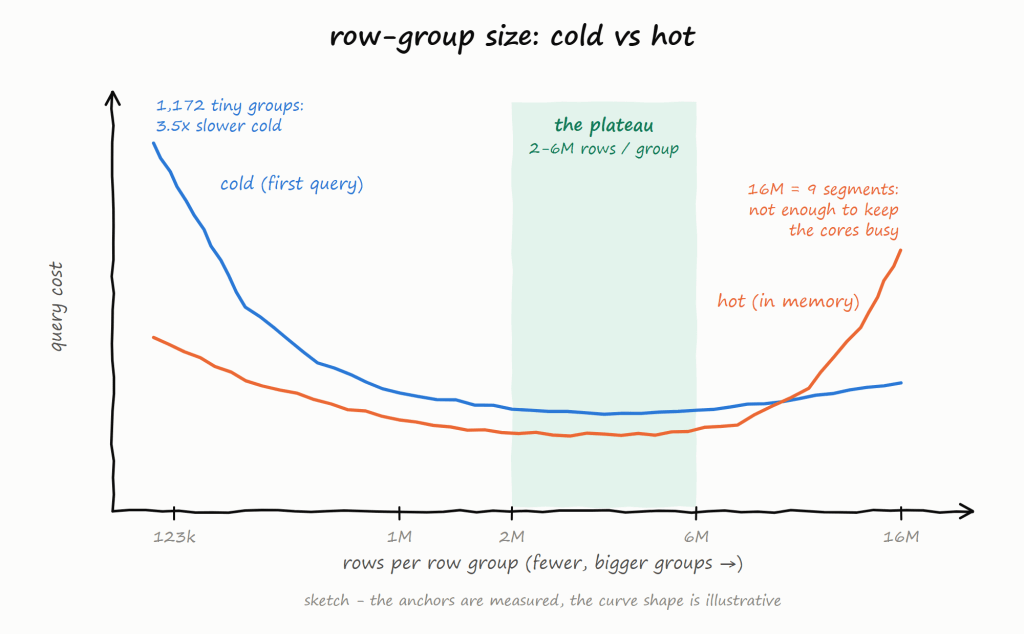
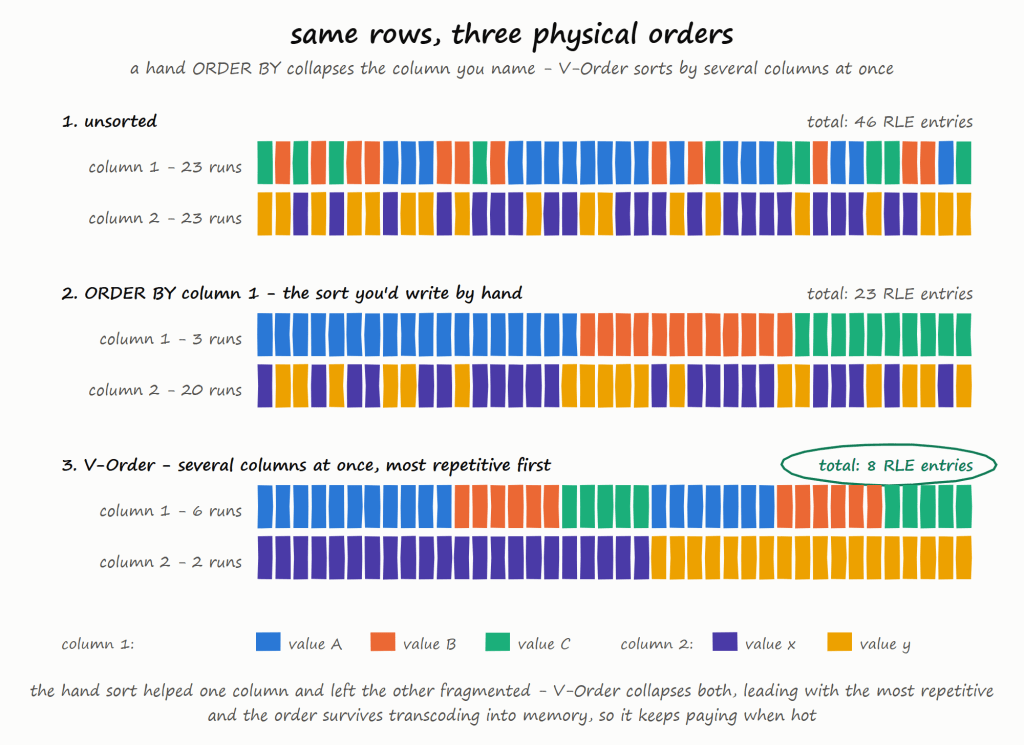
All those tools in Fabric are awesome, but it is a lakehouse and the whole point of a lakehouse is to use whatever you want as long as it produces Parquet and Delta/Iceberg metadata, ideally sorted with a decent row group size from 2M to 16M.

Why DuckLake instead of Delta or Iceberg?

  • DuckDB Delta write support is still experimental.
  • OneLake Catalog supports Iceberg read only.

If we had Iceberg write, that would be my first preference.

Why is the semantic model AI-generated?

Because it is cool 🙂 and it is unbelievable that AI managed to write it out of thin air and did cool stuff like generating descriptions so Power BI AI behaves better.

What happens if the pipeline fails mid-run?

The DuckLake metadata DB lives on OneLake (Files section). If the run fails mid-way:

  • Downloaded source files are already archived on OneLake (no re-download needed)
  • DuckLake metadata reflects whatever was committed before the failure
  • Next run picks up where it left off using the archive log

The pipeline has a 1-hour timeout. If it hangs, Fabric kills it and the next hourly run starts fresh.

Can this scale?

Python notebooks scale to half a TB of RAM. If you need more, then you are reading the wrong blog 🙂

Where is TMDL?

I could not deploy using TMDL, even after feeding AI all kurt buhler articles 🙂 bim seems to be better undersood at least for now.

Why use SQLite instead of DuckDB to store the metadata DB?

The Files section of OneLake is not a real POSIX filesystem. It is not like your local disk — it basically uses FUSE. All Python engines think it is a real filesystem, but I noticed SQLite works better than DuckDB for this. It flushes data more reliably.

What is skill

In this case, a skill is simply a way to capture what was learned during the work so the AI can reuse that knowledge later.

I wrote the skill after finishing the task, then asked the AI to summarize the key learnings and steps. The idea is that next time the AI runs a similar task, it will be better informed and produce better results.

This is not specific to Claude. The same approach works with Copilot as well. The format is different, but the idea is exactly the same: capture the knowledge once so the AI can reuse it later.

Parting Thoughts

Everything you have heard about AI is pretty much true. The only wrong part was the timing. We all knew about AI’s potential, but in my experience something changed around December 2025. Suddenly AI became genuinely useful — less hallucination, and it just works well enough. Especially when you can test the outcome. And that is the key insight: data engineering is, in a sense, just software engineering. AI writes the code, AI does everything. Your job as a user is to make sure the tests are comprehensive. Contrary to what you hear from professional software engineers, you don’t need to care about the general case. If it is solid enough and it works for your use case, that is all that matters. Nothing more.

There is another aspect worth mentioning. There is a real market for business users who are not programmers. There is enormous value in using your laptop as your main dev and test environment. You open VSCode, you talk to your favorite AI agent, you run dbt run, and you see results in seconds. That feedback loop changes everything. Data platforms like Fabric become a hosting environment with security boundaries, governance, and all that.

and if you are still reading, dbt test are just awesome !!!

Python Engines current Onelake Catalog integration

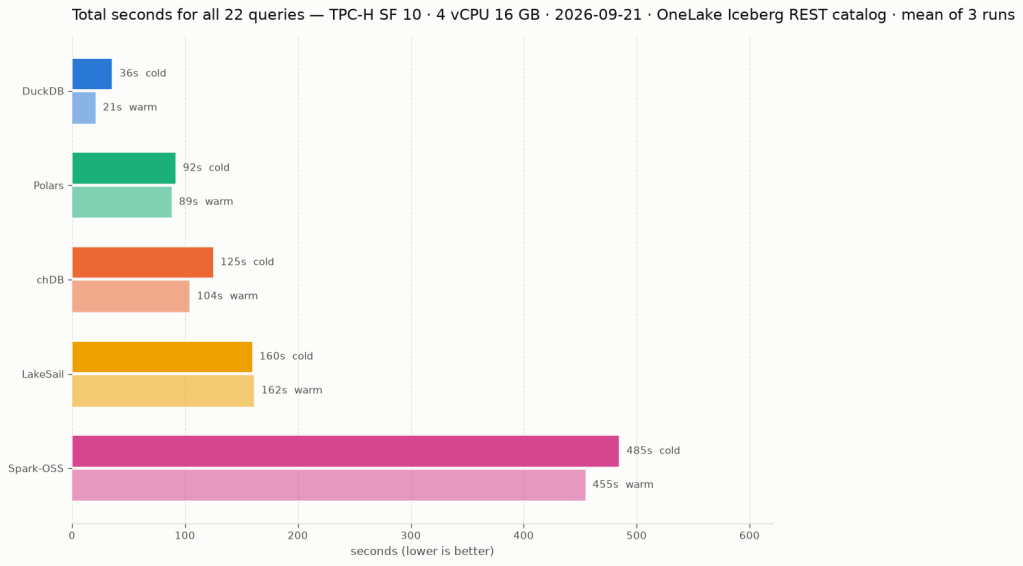
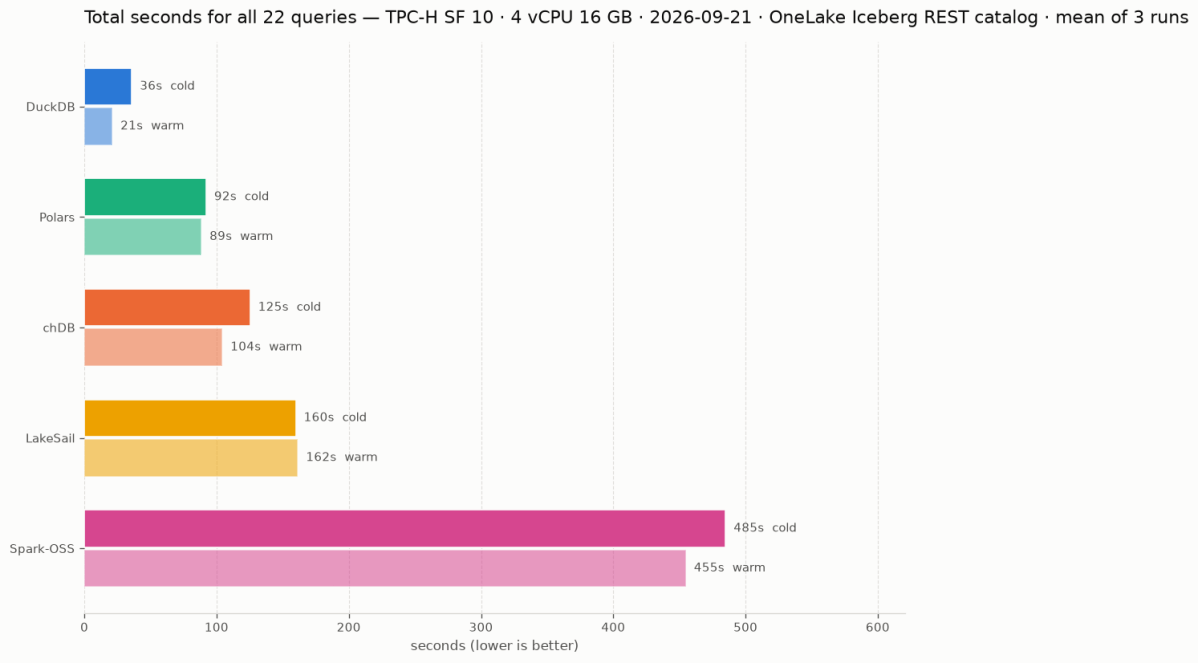
Same 22 TPC-H queries. Same Delta Lake data on OneLake (SF10). Same single Fabric node. Five Python SQL engines: DuckDB (Delta Classic), DuckDB (Iceberg REST), LakeSail, Polars, DataFusion , you can download the notebook here

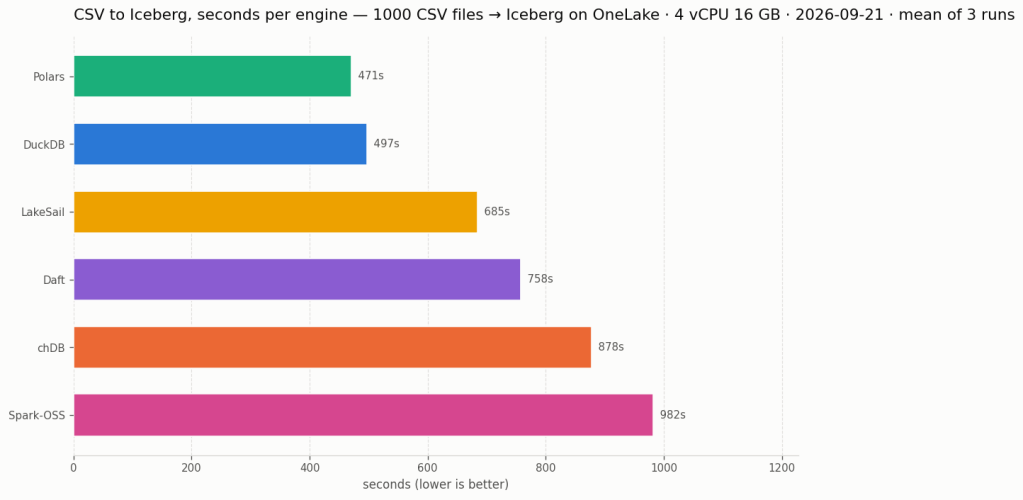
unfortunately both daft and chdb did not support reading from Onelake abfss

DuckDB iceberg read support is not new, but it is very slow, but the next version 1.5 made a massive improvements and now it is slightly faster than Delta

They all run the same SQL now

All five engines executed the exact same SQL. No dialect tweaks, no rewrites. The one exception: Polars failed on Query 11 with

`SQLSyntaxError: subquery comparisons with '>' are not supported`

Everything else just worked,SQL compatibility across Python engines is basically solved in 2026. The differentiators are elsewhere.

Freshness vs. performance is a trade-off you should be making

import duckdb
conn = duckdb.connect()
conn.sql(f""" install delta_classic FROM community ;
attach 'abfss://{ws}@onelake.dfs.fabric.microsoft.com/{lh}.Lakehouse/Tables/{schema}'
AS db (TYPE delta_classic, PIN_SNAPSHOT); USE db
""")

`MAX_TABLE_STALENESS ‘5 minutes’` means the engine caches the catalog metadata and skips the round-trip for 5 minutes.

DuckDB’s Delta Classic does the same with `PIN_SNAPSHOT`.

import duckdb
conn = duckdb.connect()
conn.sql(f""" install delta_classic FROM community ;
attach 'abfss://{ws}@onelake.dfs.fabric.microsoft.com/{lh}.Lakehouse/Tables/{schema}'
AS db (TYPE delta_classic, PIN_SNAPSHOT); USE db
""")

Your dashboard doesn’t need sub-second freshness. Your reporting query doesn’t care about the last 30 seconds of ingestion. Declaring a staleness budget upfront – predictable, explicit – is not a compromise. It’s the right default for analytics.

Object store calls are the real bottleneck

Every engine reads from OneLake over ABFSS. Every Parquet file is a network call. It doesn’t matter how fast your engine scans columnar data in memory if it makes hundreds of HTTP calls to list files and read metadata before it starts.

DuckDB Delta Classic (PIN_SNAPSHOT): caches the Delta log and file list at attach time. Subsequent queries skip the metadata round-trips.

DuckDB Iceberg (MAX_TABLE_STALENESS): caches the Iceberg snapshot from the catalog API. Within the staleness window, no catalog calls.

LakeSail: has native OneLake catalog integration (SAIL_CATALOG__LIST). You point it at the lakehouse, it discovers tables and schemas through the catalog. Metadata resolution is handled by the catalog layer, not by scanning storage paths, but it has no concept of cache, every query will call Onelake Catalog API

Polars, DataFusion: resolve the Delta log on every query. Every query pays the metadata tax.

An engine that caches metadata will beat a “faster” engine that doesn’t. Every time, especially at scale.

How about writes?

You can write to OneLake today using Python deltalake or pyiceberg – that works fine. But native SQL writes (CREATE TABLE AS INSERT INTO ) through the engine catalog integration itself? That’s still the gap, lakesail can write delta just fine but using a path.

LakeSail and DuckDB Iceberg both depend on OneLake’s catalog adding write support. The read path works through the catalog API, but there’s no write path yet. When it lands, both engines get writes for free.

DuckDB Delta Classic has a different bottleneck: DuckDB’s Delta extension itself. Write support exists but is experimental and not usable for production workloads yet.

The bottom line

Raw execution speed will converge. These are all open source projects, developers read each other’s code, there’s no magical trick one has that others can’t adopt. The gap narrows with every release.

Catalog Integration and cache are the real differentiator. And I’d argue that even *reading* from OneLake is nearly solved now.

Full disclosure: I authored the DuckDB Delta Classic extension and the LakeSail OneLake integration (both with the help of AI), so take my enthusiasm for catalog integration with a grain of bias

Querying a Onelake Table with RLS and CLS Using DuckDB’s MSSQL Extension

Onelake supports Row Level Security and Column Level Security. These protections work when you use trusted engines such as Power BI or Spark running inside Microsoft Fabric. In those environments, the compute engine operates within a controlled boundary, so security rules can be enforced properly.

However, if you try to access the storage directly from a Python notebook or a local engine running on your laptop, including open source Spark, direct access is blocked. Otherwise, Row Level Security and Column Level Security would be meaningless. Security only works when the engine itself is trusted and governed.

This blog show a workaround by laveraging SQL Endpoint, These policies are enforced at the SQL endpoint, meaning any external tool that connects through it — including DuckDB — automatically respects them.

Let’s walk through a quick example.

The Data

We have a power.duid table containing 626 rows of Australian power generation facilities. Columns include DUID, Region, FuelSourceDescriptor, Participant, State, latitude, and longitude.

Configuring Row-Level Security

In the Lakehouse role readsometables, we add an RLS rule that restricts visibility to a single region:

SELECT * FROM power.duid WHERE Region='WA1'

Members of this role will only see rows where Region = 'WA1'.

Configuring Column-Level Security

On the same role, we enable CLS and grant Read visibility only to specific columns: DUID, Region, FuelSourceDescriptor, State, latitude, and longitude. The Participant column is excluded.

Querying with DuckDB’s MSSQL Extension

From any Python environment, we can connect to the SQL endpoint using DuckDB’s community MSSQL extension and Azure authentication:

import duckdb
from azure.identity import DefaultAzureCredential

conn = duckdb.connect()
token = DefaultAzureCredential().get_token("https://database.windows.net/.default").token

conn.sql(f"""
    ATTACH IF NOT EXISTS
    'Server=<your-sql-endpoint>;Database=data'
    AS data (TYPE mssql, ACCESS_TOKEN '{token}')
""")

if you are running it inside Fabric notebook, first you need to updgrade duckdb,

!pip install duckdb --upgrade
import sys
sys.exit(0)

the run this code

import duckdb
conn = duckdb.connect()
token = notebookutils.credentials.getToken('sql')
conn.sql(f"""
install mssql from community ;
ATTACH if not exists
'Server=SQL_endpoint;Database=data'
AS data (TYPE mssql, ACCESS_TOKEN '{token}')
""")


Now when we query, RLS and CLS are enforced server-side:

conn.sql("SELECT DISTINCT(Region) FROM data.power.duid").show()

Only WA1 — the RLS filter is working. And if we select all columns:

conn.sql("SELECT * FROM data.power.duid LIMIT 4").show()

you get an error, that you can not select Participant

No Participant column — CLS is doing its job, now if you remove it , everything works fine